Please take a look here and remember how does Book class look like.
If we want to manage books, we may add Action column to the book list, and generate the URLs for the actions we need. We can do that by rewriting getRenderableFields() method, like we already did for users.
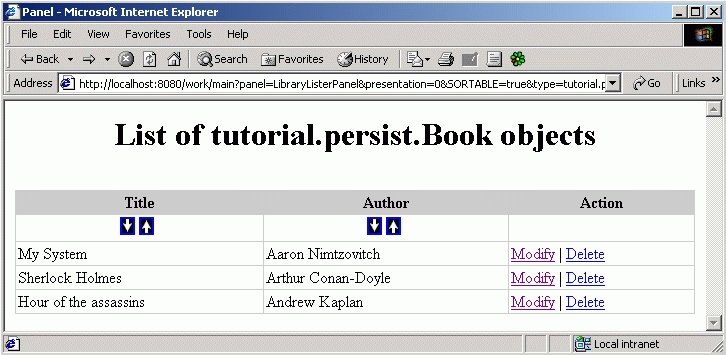
Now try to add by yourself 2 actions : Modify (that will modify info about a book) and Delete (that will delete a book). Look here how it was done for users. Here's what you should have if you did everything right:
public class Book extends DBPersistentObject implements Listable {

    public void define() {
        addField("Title"new VarcharField(50));
        addField("Author"new VarcharField(50));
        addField("UserID"new IDField());
    }

    public Pair[] getRenderableFields(int presentation) {
        CompositeActionUrl actions = new CompositeActionUrl();
        StringBuffer sb = new StringBuffer();
        sb.append("main?");
        sb.append("panel=ManageBookForm");
        sb.append("&next_panel=LibraryAdminPanel");
        sb.append("&objectID=");
        actions.addActionUrl(new ActionUrl("Modify", sb.toString()));
        sb = new StringBuffer();
        sb.append("main?");
        sb.append("panel=DeleteBookPanel");
        sb.append("&objectID=");
        actions.addActionUrl(new ActionUrl("Delete", sb.toString()));
        return new Pair[]{
            new Pair("Title""Title"),
            new Pair("Author""Author"),
            new Pair(actions, "Action")
        };
    }
}

Now you can modify data about books and even delete books from the list:

Here is the panel DeleteBookPanel:
public class DeleteBookPanel extends AbstractPanel {
    public static final String tableBookName = "obj_Book";
    public static final String OBJECT_ID = "OBJECT_ID";
    public int delay = 3;

    public String show() {
        StringBuffer sb = new StringBuffer();
        SqlUtil.delete(tableBookName, new Pair[]{
            new Pair(OBJECT_ID, inOut.getValue("objectID"))});
        sb.append("Book was deleted. <BR>");
        return sb.toString();
    }

    public String getHeader() {
        StringBuffer sb = new StringBuffer();
        sb.append("<HTML><HEAD>");
        sb.append("<META HTTP-EQUIV=\"Refresh\"");
        sb.append("CONTENT=\"" + delay + ";URL=main?panel=LibraryAdminPanel\">");
        sb.append("</HEAD><BODY>");
        return sb.toString();
    }
}
It just takes the book ID from parameters and deletes the object identified by this ID from the database.

Now we can add and edit users. Also we can add, edit and delete books. We've almost made a small virtual library :-)
But something is still missing : our users can't borrow books yet. Let's implement it now.

Previous page Tree of contents Next page