Let's go back to LibraryUser persistent object. We need to improve it a bit.
public class LibraryUser extends DBPersistentObject implements Listable {
    public void define() {
        addField("FirstName"new VarcharField(50));
        addField("LastName"new VarcharField(50));
        addField("Age"new IntField());
        getField("Age").addValidator(new AgeValidator());
        addField("Address"new VarcharField(100));
    }

    public Pair[] getRenderableFields(int presentation) {
        return new Pair[]{
            new Pair("FirstName""First Name"),
            new Pair("LastName""Last Name"),
            new Pair("Age""Age"),
            new Pair("Address""Address"),
        };
    }
}
We made our persistent object listable. getRenderableFields() method is used when we want do display lists of our persistent objects. Using this method we may design miscelaneous looks of lists that we want to display. Now let's make a panel used to display the list of users and books.
We will just extend ListerPanel - a panel used to display lists of objects.
public class LibraryListerPanel extends ListerPanel {
    public String show() {
        StringBuffer sb = new StringBuffer();
        sb.append("<CENTER><H1> List of ");
        sb.append(inOut.getValue("type"));
        sb.append(" objects</H1></CENTER><BR>");
        sb.append(super.show());
        return sb.toString();
    }
}
We just added some additional headers and called the same method of the parent class. super.show() will do all the work for us.
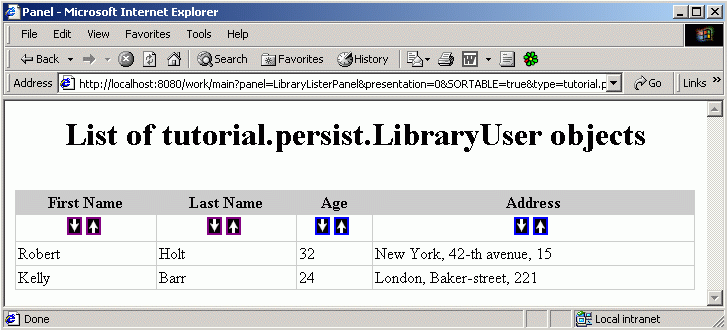
Use the following URL to access the panel: "http://localhost:8080/work/main?panel=LibraryListerPanel&presentation=0&SORTABLE=true&type=tutorial.persist.LibraryUser"
(In fact, the presentation parameter in this URL is redundant, since it's not used, but we'll need it when we will make the persistent object Book listable)
By clicking those arrows you can sort the list.
Modify the persistent object Book to look like this:

public class Book extends DBPersistentObject implements Listable {

    public void define() {
        addField("Title"new VarcharField(50));
        addField("Author"new VarcharField(50));
        addField("UserID"new IDField());
    }

    public Pair[] getRenderableFields(int presentation) {
        return new Pair[]{
            new Pair("Title""Title"),
            new Pair("Author""Author"),
            new Pair(actions, "Action")
        }

    }
}

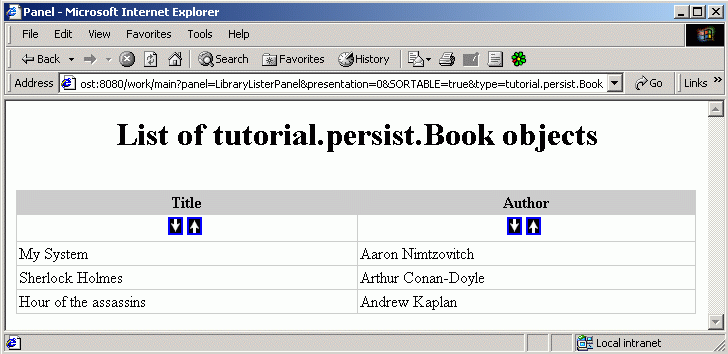
Now you can see the list of books by simply modifying the type parameter in the previous URL - just put type=tutorial.persist.Book instead of type=tutorial.persist.LibraryUser.

Previous page Tree of contents Next page