public class Book extends DBPersistentObject implements Listable {

          private final String null_id = "null_id";

          public static final int USER_BOOKS_PRESENTATION = 1;


          public void define() {

              addField("Title", new VarcharField(50));

              addField("Author", new VarcharField(50));

              addField("UserID", new IDField());

          }


          public Pair[] getRenderableFields(int presentation) {

              if (presentation == DEFAULT_PRESENTATION) {

                  CompositeActionUrl actions = new CompositeActionUrl();

                  StringBuffer sb = new StringBuffer();

                  sb.append("main?");

                  sb.append("panel=ManageBookForm");

                  sb.append("&next_panel=LibraryAdminPanel");

                  sb.append("&objectID=");

                  actions.addActionUrl(new ActionUrl("Modify", sb.toString()));

                  sb = new StringBuffer();

                  sb.append("main?");

                  sb.append("panel=DeleteBookPanel");

                  sb.append("&objectID=");

                  actions.addActionUrl(new ActionUrl("Delete", sb.toString()));

                  return new Pair[]{

                      new Pair("Title", "Title"),

                      new Pair("Author", "Author"),

                      new Pair(actions, "Action")

                  };

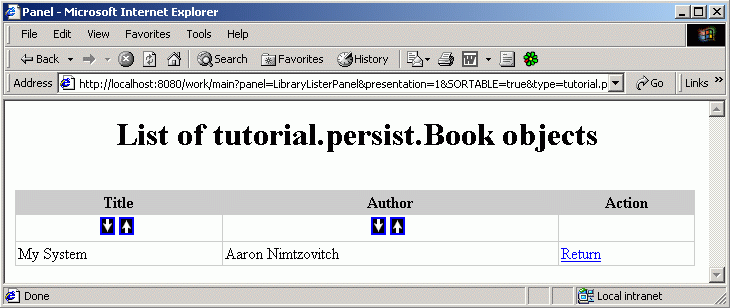
              } else if (presentation == USER_BOOKS_PRESENTATION) {

                  //books borrowed by this user

                  BorrowField borrowField = new BorrowField("Return");

                  return new Pair[]{

                      new Pair("Title", "Title"),

                      new Pair("Author", "Author"),

                      new Pair(new FormConditionField("UserID", "user_id"), ""),

                      new Pair(borrowField, "Action")

                  };

              } else {

                  //not borrowed books

                  BorrowField borrowField = new BorrowField("Borrow");

                  return new Pair[]{

                      new Pair("Title", "Title"),

                      new Pair("Author", "Author"),

                      new Pair(new ConditionField("UserID", null_id), ""),

                      new Pair(borrowField, "Action")

                  };

              }

          }


          class BorrowField extends FormActionField {

              private String action = new String();


              public BorrowField(String action) {

                  fieldName = "user_id";

                  this.action = action;

              }


              public String getPresentation(ServletInOut inOut, ResultRow row) {

                  StringBuffer sb = new StringBuffer("<a href=\"");

                  sb.append("main?panel=" + action + "BookPanel&user_id=");

                  String userID = inOut.getValue(fieldName);

                  sb.append(userID);

                  sb.append("&book_id=" + row.getString(DBPersistentObject.ID_FIELD_NAME));

                  sb.append("\">" + action + "</a>");

                  return sb.toString();

              }

          }

} |